

As an editor, you have a lot of things to keep track of. I've previously published a whole checklist of things you need to do. One of them is optimising images. You can easily (and for free) save around 60-70% on every image.
Further reading: The ultimate checklist for publishing better content on the web
What does it mean to optimise images?
You might first think of an image's pixel size. Not using a bigger image than you need.
That's a good first step. Your content management system (CMS) should help you with this.
But pixel size isn't the only thing that matters. Every image carries lots of metadata. Data about the image itself, which can often be helpful and important. On the web, though, it usually isn't needed. All of this data can be removed, and the file size (in bytes) gets smaller.
On top of that, you can often lower the image quality a little without anyone noticing. That can cut the file size by up to 60-70%. With no noticeable loss.

Why is it so important to optimise images?
Many studies have shown how impatient we humans are. We don't want to wait for things to load. You probably know this about yourself already. The threshold for something to feel instant is usually around 100ms.
All data is really just characters. Images too. The fewer characters in the file, the faster the data downloads. The website's own code doesn't weigh much. Usually it's images and videos that are the biggest challenge.
It sounds obvious, doesn't it? If you can bring down the file size, meaning how many bytes the image is, without the quality suffering, why wouldn't you?
Other studies go further and show the business consequences. The BBC has found that for every extra second their website takes to load, they lose 10% of their visitors. When Pinterest cut perceived wait times by 40%, their traffic from Google went up and sign-ups rose by 15%.
The images on your website are usually the lowest-hanging fruit. Optimising them is quick and very effective. A good place to start.
Lossless or lossy
Two terms in image optimisation are lossless and lossy. You'll come across them all the time.
Lossless means the quality stays exactly the same. You don't get savings as big, either. The image ends up heavier. But you lose nothing. Hence the name lossless.
Lossy on the other hand affects image quality. Often only marginally. So little that it takes a very trained eye and large images to notice. That's why I often recommend lossy compression. The gain in load time is worth the drop in quality. The exception is portfolios or other experiences where large, high-quality images matter above all else. That's rare.
Let the server do the work
Ideally, your content management system (CMS) and server should do the work together. As a web editor, you don't have to think about resolution, dimensions, file size and format. The tool does the work for you.
That's how the websites we build for our clients work. You upload a really high-resolution image. Then the tool makes sure visitors get an optimised image.
Desktop tools that help you optimise images
If your tool doesn't do the work today, it's still not that hard.
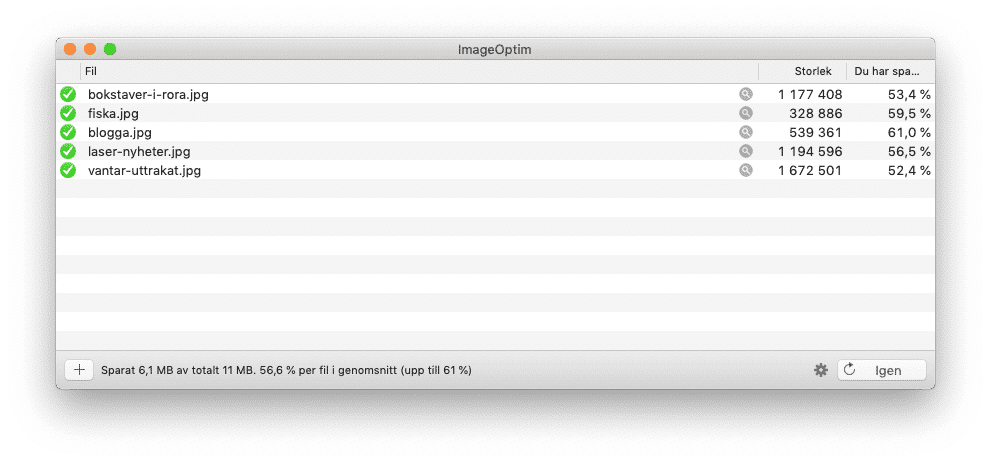
If you use a Mac, the app ImageOptim will be your best friend. The default settings work fine. You just drag and drop images into the app, and they're optimised for you. Often they end up 60-70% smaller without any difference in quality you'd notice. ImageOptim is completely free and works with everything from jpg and png to svg.
If you use Adobe apps like Photoshop or Illustrator, there's built-in compression when you export or save for web and devices. ImageOptim is better, though. It can often save another 40-50% after Adobe's optimisation.
Even if you design in Sketch or Figma, you can choose the quality of your images. Here too, ImageOptim often shaves off another 40-50%.
Make image optimisation part of your workflow
Whether you're publishing an article on your website or adding images to your online store, you should make image optimisation part of your workflow.
Feel free to use our checklist. It's completely free and you don't have to hand over any details to download it.
Or better still, find out whether your content management system (CMS) and server can do the job instead. You'll save lots of time and get the most benefit. Optimisation is made for automated work by a server.