

Do you know which digital marketing campaign drives the most traffic and sales to your website? Maybe you've already heard of UTM tags?
Perhaps you keep track of the different referral sources in Google Analytics. The problem is that you only find out which website the visitor came from. You still don't know exactly which campaign the visitor came from.
The solution? UTM (Urchin Tracking Module) tags.
When you tag your links with UTM tags, you get all the information you need. The best part is that it's super easy.
UTM tags are simply parameters you add to a URL. When someone clicks the URL with the UTM tags in it, the values are saved in Google Analytics.
How to generate your own campaign URLs with UTM tags using Google's URL tool
Since UTM tags are so good for tracking digital campaigns, it would be nice if there was a simple tool to help you, right?
Luckily, Google has a super simple helper tool: Campaign URL Builder
The tool is a form you fill in on Google's site. What you get back is your URL with the correct UTM tags. The form looks like this:
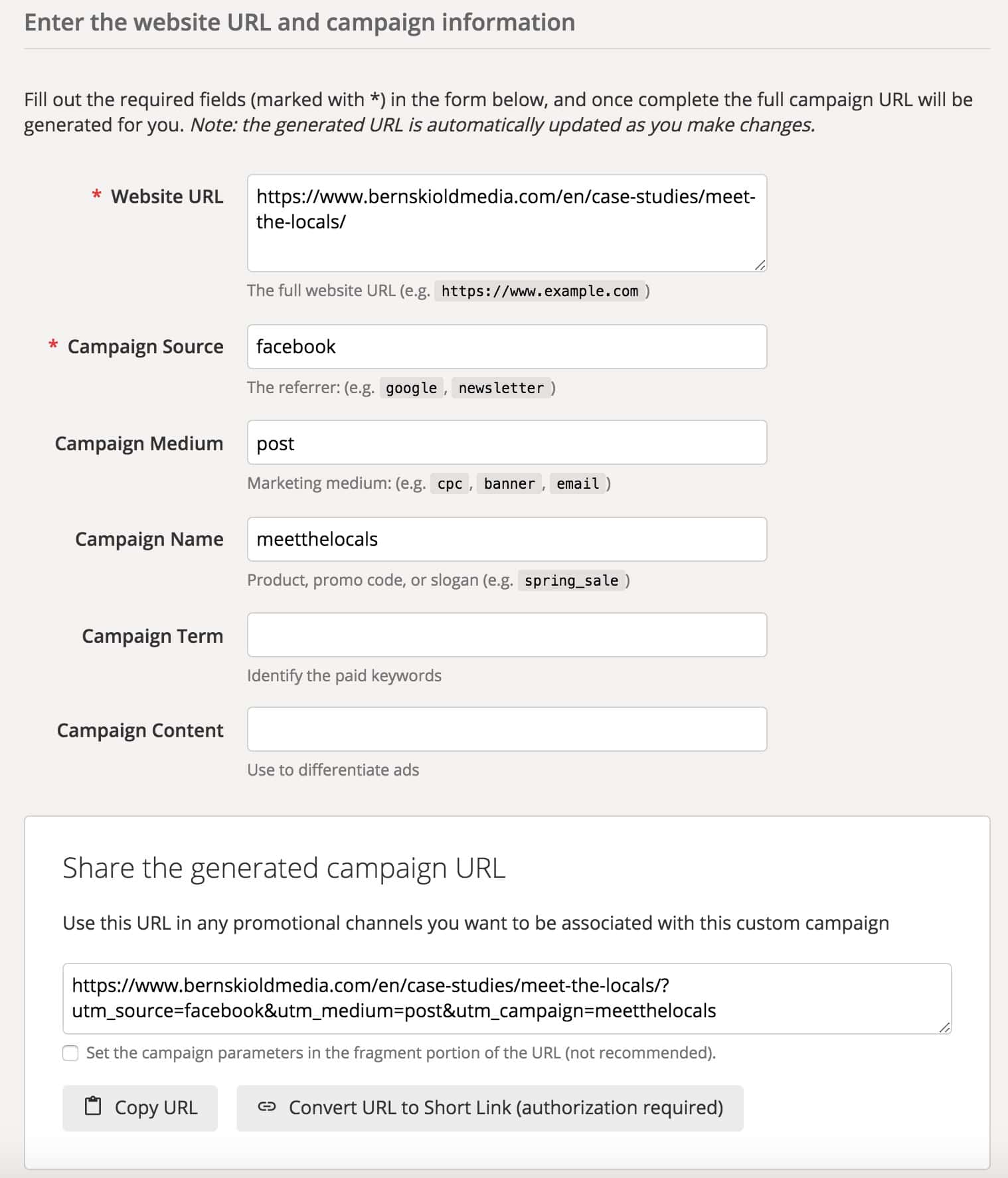
There are five possible levels you can fill in. Strictly speaking, only the first one is required, but you'll get the best results with at least the first three.
Campaign Source: The platform or website the traffic comes from. This could be Facebook, your newsletter or another website, for example.
Campaign Medium: Use the medium to identify the type of traffic. This could be cost per click (CPC), email, affiliate or organic, for example.
Campaign Name: Your own name for the campaign that helps you find it in Google Analytics. This could be the name of the newsletter send, or the blog post you're sharing, for example.
Campaign Term: Only a must for paid advertising on Google Ads or Facebook. Set it to the term in Google Ads or, for example, the ad set in Facebook.
Campaign Content: Also mostly used for paid traffic, or if you want to A/B test different ads. A descriptive name that lets you tell different creatives apart and learn which one works best.
If you want to break down ads at campaign level, you need to use the first three. If you want to compare performance at ad level instead, you need to use all five.
Remember that the tags stick around when links are shared
Even though tagging your links is great, there's a small “but” that's important to know about. UTM tags are very persistent.
Say you create a link with UTM tags and share it on Facebook. Then someone shares the link with a friend by email. The friend then shares it on Twitter, and the post gets retweeted a number of times.
How will all that traffic be tagged? As Facebook, just as you first set it.
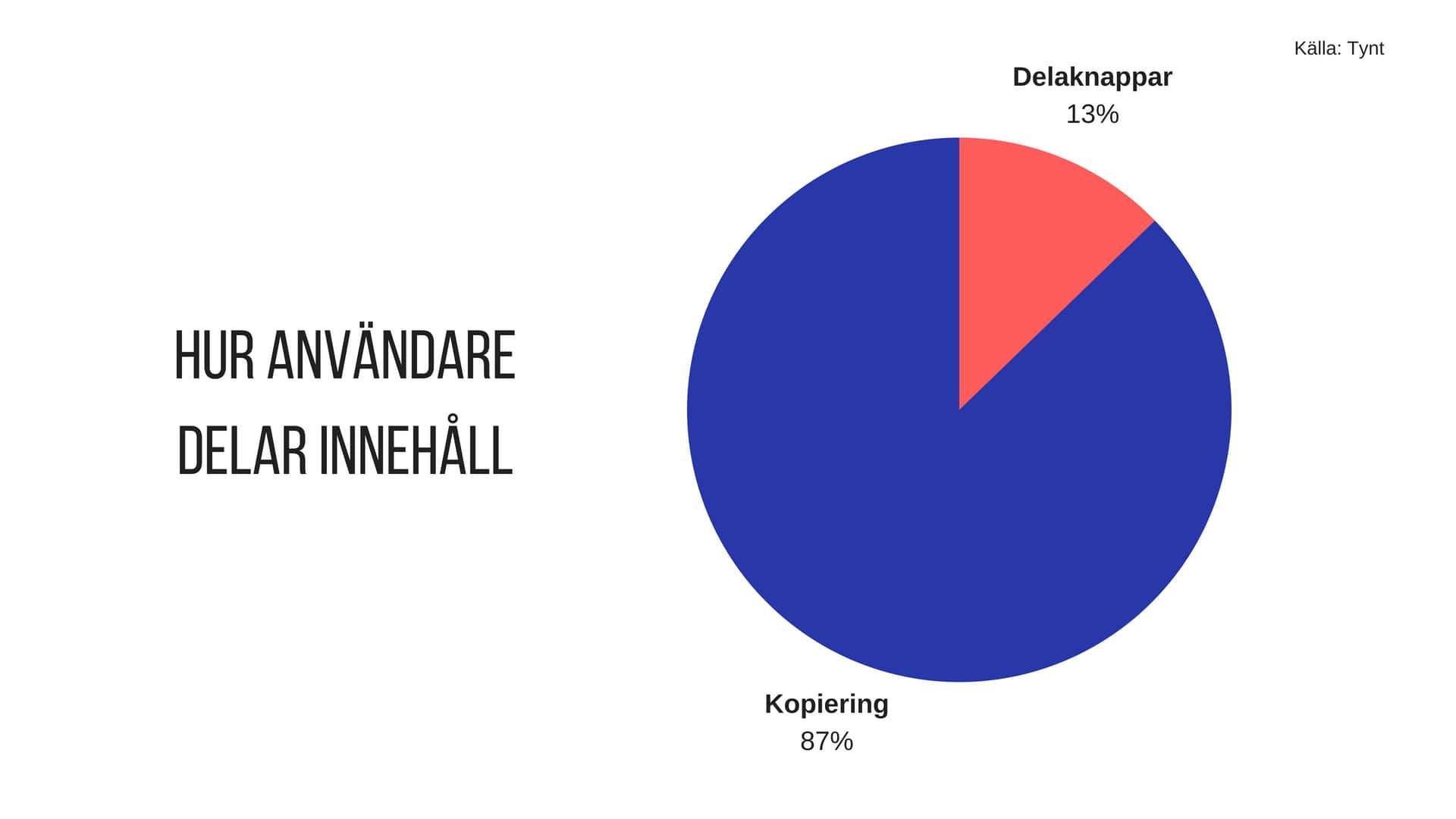
Since UTM tags are just part of the URL, they come along when someone else passes the URL on, unless they remove the tags of course. The chance of that is small, though. 82% of all sharing is done by copy and paste.
This doesn't take away the value of tagging your links with UTM tags, of course. But it's important to know that there's a certain margin of error when you interpret the data in Google Analytics.
Guidelines for tagging URLs
To get real value out of tagging your links with UTM tags, you need to follow a few guidelines.
1. Be consistent when you set your UTM tags
It doesn't really matter what you put in the tags. Google Analytics will read it anyway. What matters is that you're consistent. Otherwise you'll never get a proper summary.
Don't switch between “paid” and “cpc”, for example, to mark paid traffic. Pick one and stick to it.
💡 Tip! Create a document in your company that lists the names you use in your UTM tags. That way you avoid creating links with different tag names.
2. Use upper and lower case consistently
UTM tags are case sensitive. So “Facebook” and “facebook” will be treated differently. Make sure you have guidelines for how you write them in your company.
Or even simpler: make it a rule to always use lower case, and you'll avoid the problem.
3. Tag all the traffic you control
UTM tags really aren't just for paid traffic. You want to tag all the traffic you can tag. It lets you make decisions later, such as whether the effort you put into a source creates value.
There will of course be lots of traffic you can't tag, and that's okay. But the sooner you get into the habit of tagging traffic with UTM tags, the better you'll understand your traffic.
4. Set the source to the channel's name
To keep things simple, always set the source (utm source) to the name of the channel the link ends up in. For example: facebook for Facebook.
5. Track all your links in a spreadsheet
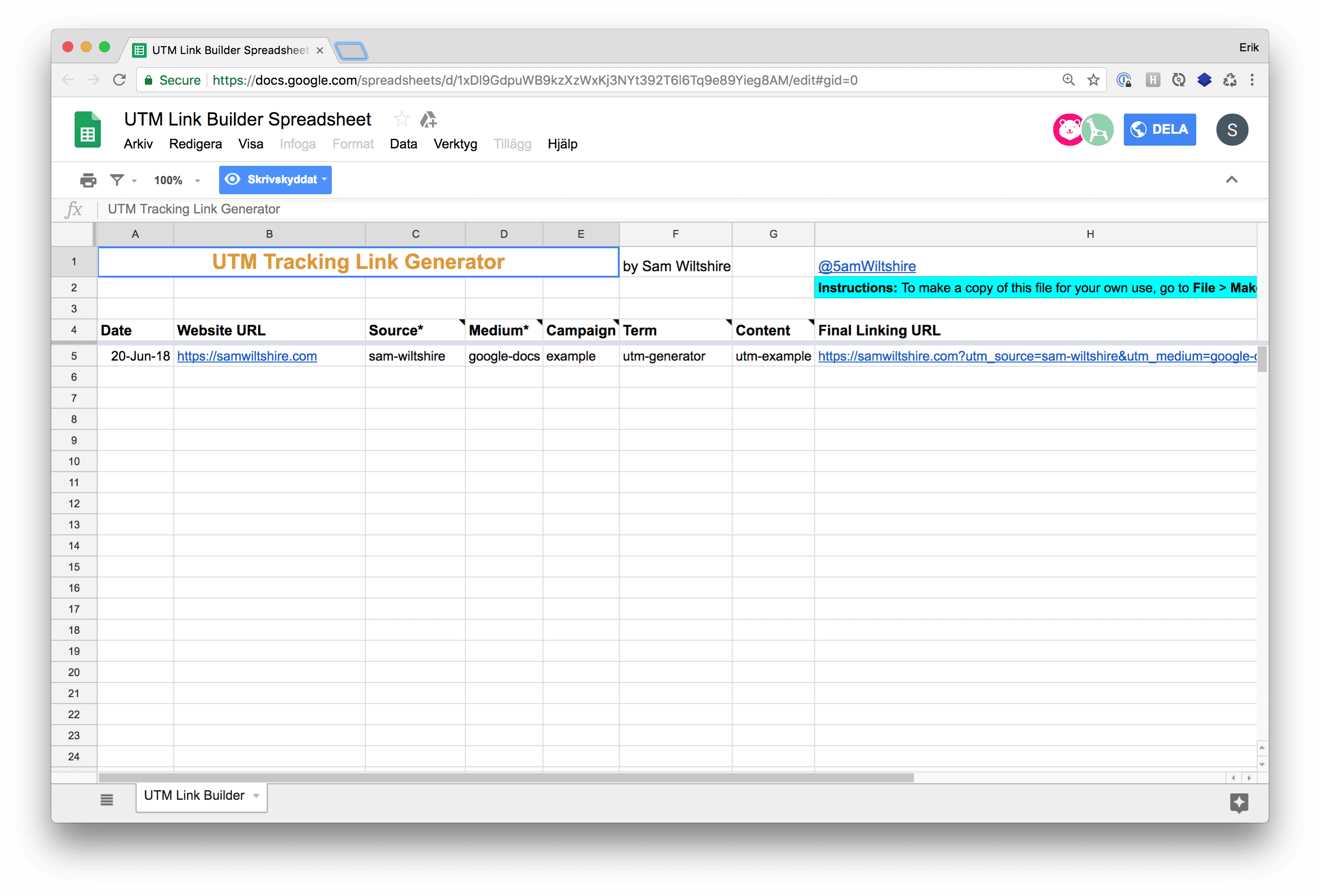
Create a spreadsheet (here's a good template) where you keep track of the links you've tagged. It's a good way for everyone on a team to stay up to date.
6. Make the campaign name the campaign's exact name
It may sound simple, but when you advertise in Google Ads, for example, make the campaign's name there the same as in your UTM tags. Same case and everything.
Just remember that spaces aren't allowed. You need to replace them with a +.
7. Google Ads partly helps you automatically
Since Google Analytics and Google Ads (formerly AdWords) are both Google products, they work together.
When you create Ads campaigns, Google will automatically tag your links with UTM tags. Handy, right?
8. Remember that users can see the values
Since UTM tags are visible in the URL, users can see the values you set. So make sure you don't use values you wouldn't be comfortable with potential customers seeing!

Two UTM tags you can start with right away
All of this can feel great in theory, but a little hard to get started with in practice. Here are two tags you can start using right away.
1. Track clicks in your newsletters
If you send newsletters, it's important to know which links your customers actually click. It can give you really valuable insights for creating more effective newsletters.
Here's what it could look like for a weekly product newsletter from an online store:
utm_source: newsletter
utm_medium: email
utm_campaign: weekly-products-20180801
We set the source to “newsletter”, which we've decided stands for our own newsletter. Maybe you send several types of email? Then it can be worth giving them clearly different sources.
You could set the campaign to the subject line of the send, for example. But since we send the same type of email every week in this example, it's even easier to standardise the name and add the date the email was sent.
Want to get even more out of UTM tags in newsletters?
You can find out which links in the newsletter work best by tagging each link uniquely with its own utm_content value.
Just make up a name for each link based on its placement and context. Then you can really track everything.
2. Add UTM tags to links you share on social media
The easiest way to find out which social media platform gets you the best results for links is to use UTM tags.

On Facebook, for example, you can share links in different ways. Among them are posts, links and ads. Here's what three UTM tags could look like for each of them when sharing this article:
?utm_source=facebook&utm_medium=post&utm_campaign=article-utm-tags?utm_source=facebook&utm_medium=link&utm_campaign=article-utm-tags?utm_source=facebook&utm_medium=cpc&utm_campaign=article-utm-tags&utm_term=page-likes&utm_content=sponsoredSummary
UTM tags are incredibly valuable for keeping track of digital campaigns. They're easy to get started with and don't actually cost anything.
The value you get from UTM-tagged links is big. If you use them properly and follow up the statistics in Google Analytics with their help, you can increase traffic, increase sales and make your digital marketing more effective.